

One of the most important concerns after trading and making a profit on Ultima Markets is undoubtedly how to smoothly withdraw your funds. Understanding how to navigate the Ultima Markets withdrawal process is crucial for every trader. Whether you're withdrawing for the first time or have done it multiple times, mastering the correct withdrawal method and process not only ensures the safety of your funds but also allows you to experience the real rewards of trading.
In this article, we will provide a detailed guide to the Ultima Markets withdrawal process, helping you avoid common pitfalls and offering useful tips to speed up the withdrawal process. Whether you choose bank transfer, e-wallet, or other payment methods, we will provide comprehensive guidance to ensure you can smoothly and securely withdraw your profits into your account.
Ultima Markets Withdrawal Notes
When making a withdrawal from Ultima Markets, understanding the processing time, minimum withdrawal amounts, and associated regulations for different payment methods can help ensure a smooth fund transfer. Below are several key points to pay attention to when withdrawing funds, helping you manage your financial flow effectively and avoid unnecessary delays or complications.
Withdrawal Methods and Minimum Withdrawal Amounts: Key Considerations
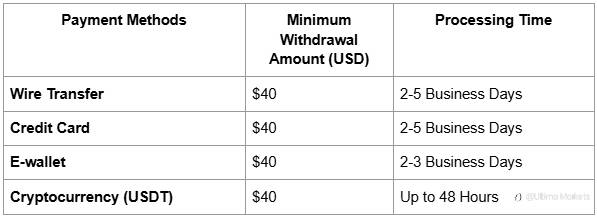
- Mobile Payment (e.g., Alipay) Users: If you have made a deposit via mobile payment methods (such as Alipay), you will need to select China UnionPay for withdrawals.
- Consistency of Deposit and Withdrawal Methods: According to Ultima Markets' policies, the withdrawal method must be the same as the deposit method. Please ensure that your withdrawal method matches your deposit method to avoid delays or rejections.
- Transaction Fees: Ultima Markets will cover the cost of the first wire transfer withdrawal each month. However, for subsequent wire transfers, the bank will charge a $20 fee per transaction.
- When choosing a withdrawal method, if you want to speed up the processing time, it is recommended to select cryptocurrency (USDT), as the withdrawal can be completed in as fast as 48 hours. For larger amounts or transactions that require higher security, a wire transfer would be a more secure option, although the processing time is typically longer, usually taking 2-5 business days.
Ultima Markets Withdrawal Process
First, log in to your personal account through the Ultima Markets app or official website:
- Go to the Account Management Center, and you can click here to access the web version;
- Enter your [registered email]
- Enter your [password]
- Click [Login]

Click [Withdrawal] > Select the [Account] you wish to withdraw from.
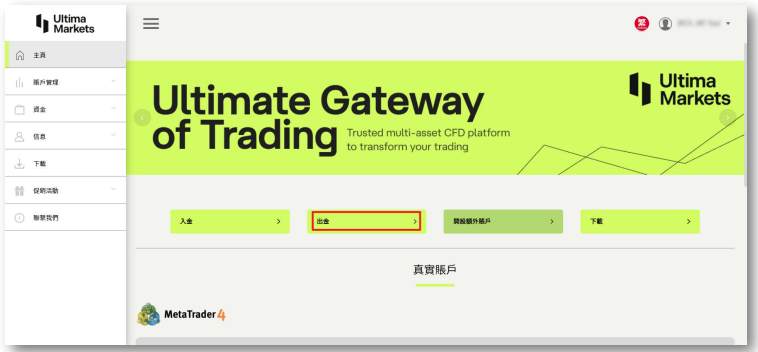
Enter the [Amount] for withdrawal > Click [Continue].
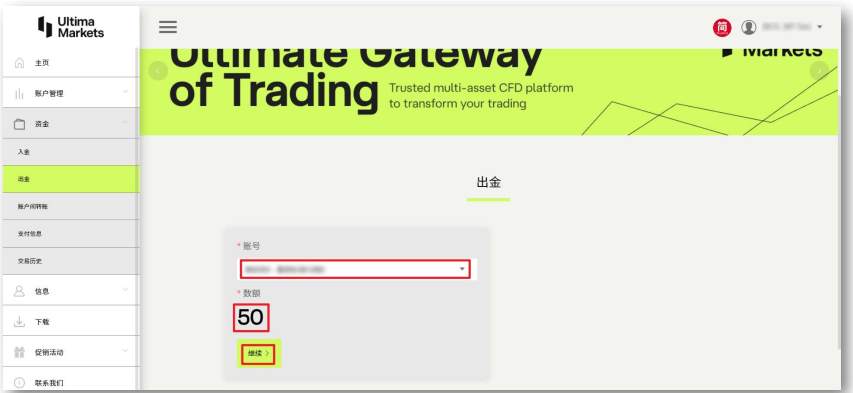
Next, choose the withdrawal method. Below is a detailed guide with images explaining the steps for each withdrawal method.
Cryptocurrency Withdrawal
Step 1: Select Cryptocurrency Withdrawal Method
Under the "Other Types" option, select "Cryptocurrency - Bitcoin" as the withdrawal method.
Step 2: Fill in Necessary Information
In the withdrawal form, fill in the following details:
- Wallet Address: Enter your Bitcoin wallet address.
- Alias: You can optionally add an alias to help identify the transaction.
Step 3: Submit Verification Code
Click on "Send Verification Code" and you will receive a verification code in your registered email. Enter the verification code and click "Submit" to complete the process.
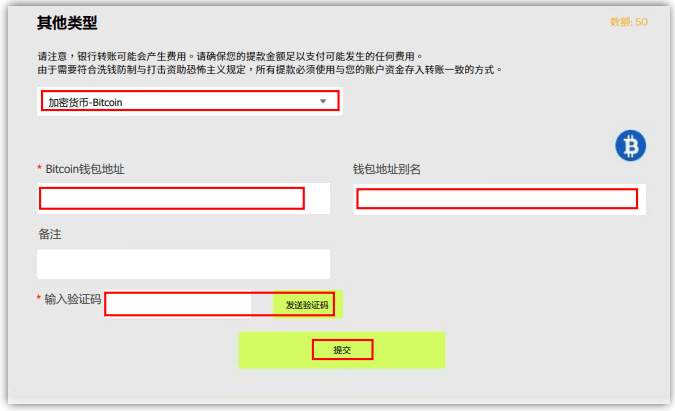
Step 4: Complete the Withdrawal Request
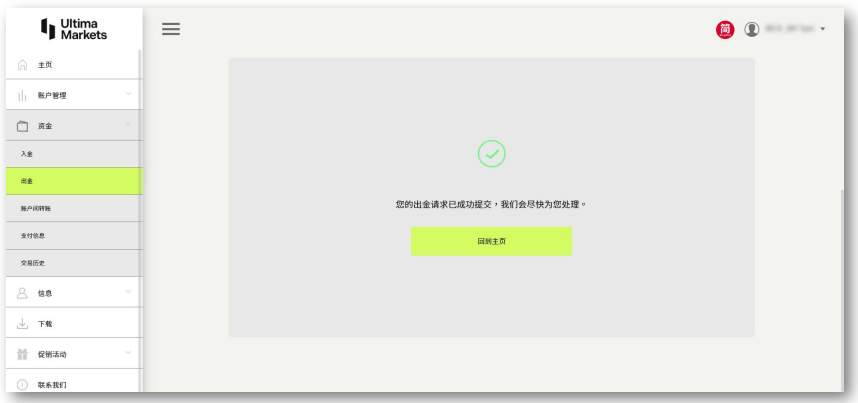
After successfully submitting, the page will display a confirmation that your withdrawal request has been successfully submitted.
Notes
- Processing Time: Cryptocurrency withdrawals generally require 0 to 2 business days for processing.
- Verify Address: Ensure that you enter the correct wallet address. An incorrect address may result in the funds being unrecoverable.
Taiwan Local Bank Transfer Withdrawal
Step 1: Select Withdrawal Method
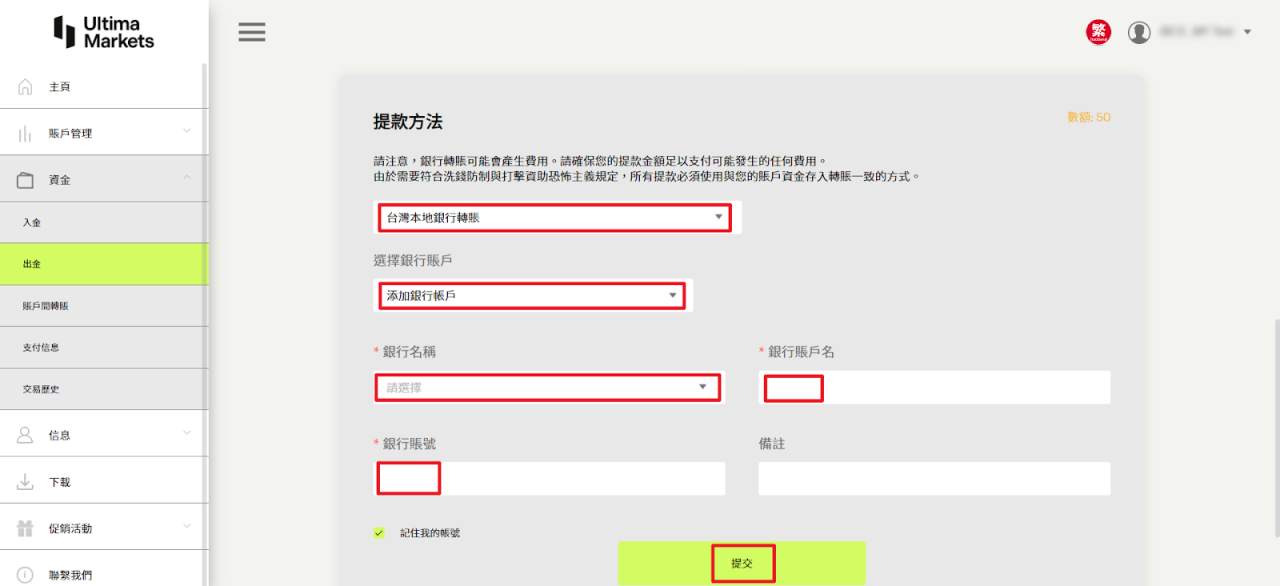
From the "Withdrawal Method" menu, select "Taiwan Local Bank Transfer" as the withdrawal option.
Step 2: Add Bank Account Information
Under "Select Bank Account," click "Add Bank Account," and then enter your bank details.
Step 3: Submit Withdrawal Request
After filling in your bank information, click "Submit" to complete your Taiwan local bank transfer withdrawal request.
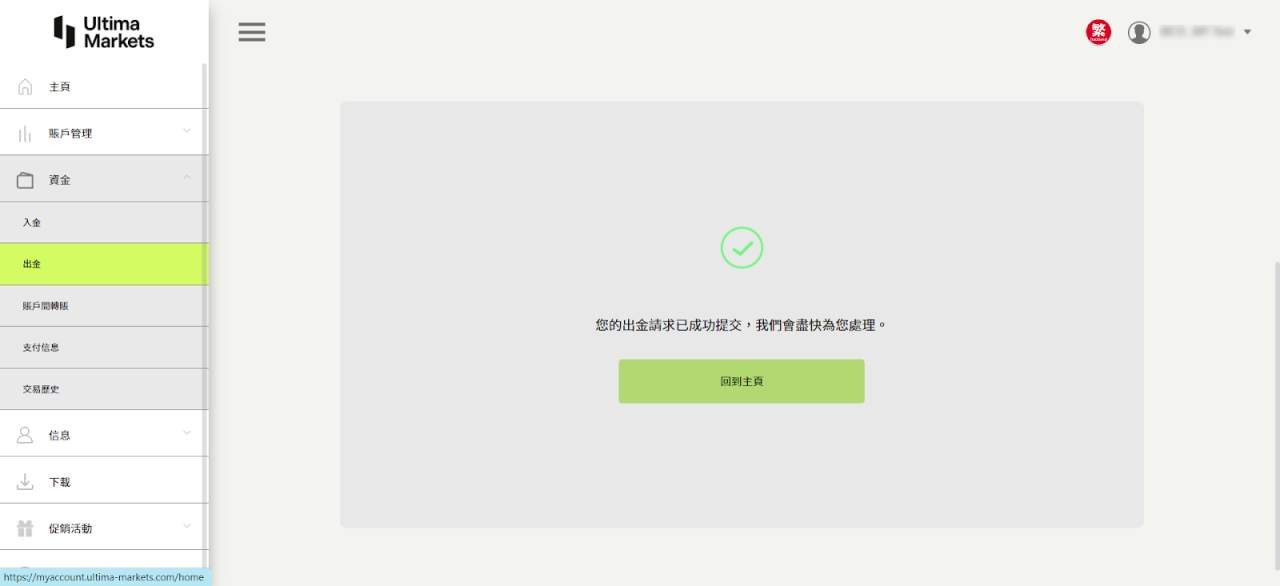
Step 4: Confirm Withdrawal Request
Once successfully submitted, the page will display a confirmation that your withdrawal request has been successfully submitted.請。
Notes
- Processing Time: Taiwan local bank transfer withdrawals typically take 1 to 2 business days to process.
- Bank Account Accuracy: Ensure the bank account information you provide is correct to avoid transfer errors or delays.
Wire Transfer Withdrawal
Step 1: Select Withdrawal Method
From the "Withdrawal Method" menu, select "International Wire Transfer," then click "Submit."
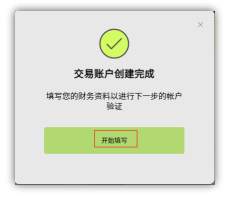
Step 2: Request International Bank Transfer Deposit
Click "Start Filling" to request an international bank transfer deposit.
Please note, this request is only for first-time applicants. If you have already completed identity verification, please skip to Step 10.
Step 3: Fill in Financial Verification Details
In the "Financial Verification" section, fill in all the required information, then click "Next."
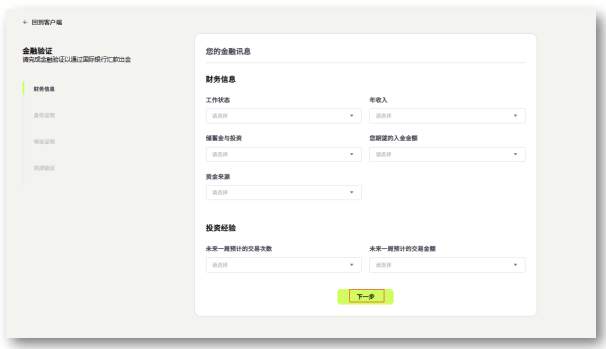
Step 4: Identity Verification
In the "Identity Verification" section, select the type of identification and enter your ID number, then upload the proof of identity document.
Please note that your name must match exactly with the document uploaded and be clearly visible.
Choose Document Type:
- National ID (front and back)
- Passport
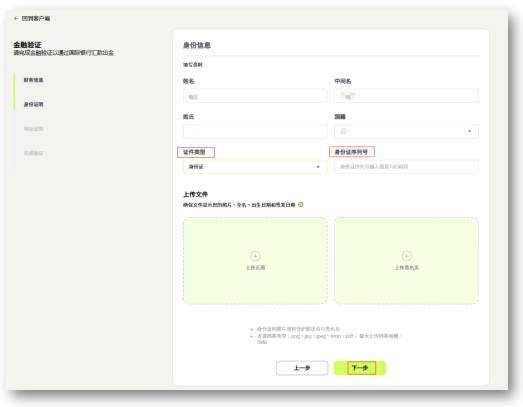
Step 5: Address Verification
In the "Address Verification" section, fill in all the required details and upload a bank statement from the past three months, then click "Confirm."
Please note that your name must match exactly with the name on the bank statement and be clearly visible.
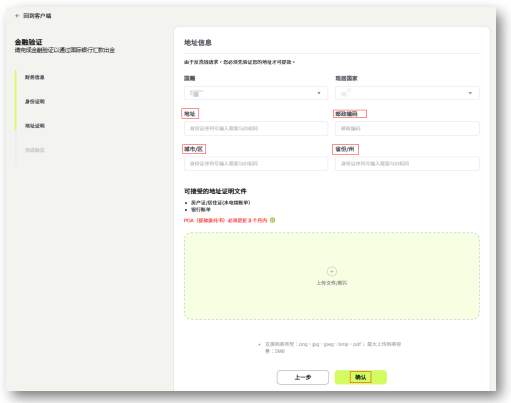
Step 6: Complete the Application
Click "Finish" to submit your application.
Please note that your application will be processed within 1 business day.
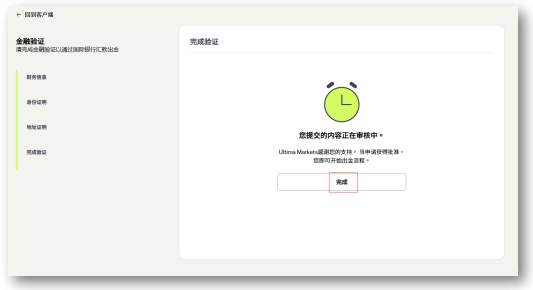
Step 7: Wait for Approval
Once approved, you will receive an email notification confirming that your POI (Proof of Identity) and POA (Proof of Address) verification have been successfully completed.


Step 8: Log in to the Account Management Center
After verification, log in to your account management center again and select "Withdrawal."
步Step 9: Choose Account and Enter Withdrawal Amount
Select the account you want to withdraw from, enter the withdrawal amount, and then click "Continue."
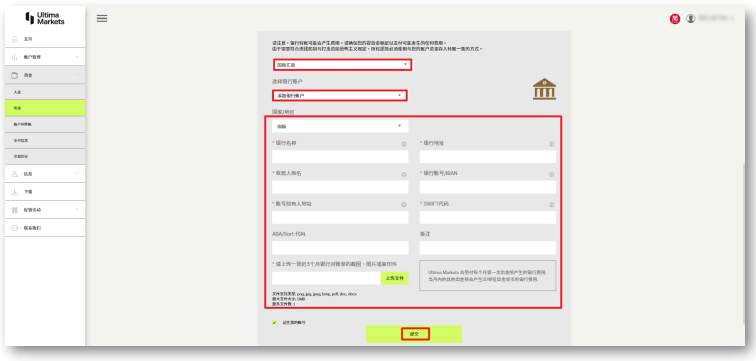
Step 10: Choose Withdrawal Method and Bank Account
In the "Withdrawal Method" section, select "International Transfer," then under "Choose Bank Account," select "Add New Bank Account." Choose "International" in the "Country/Region" field and enter your bank details.
After uploading a screenshot of your bank statement, click "Submit."
Step 11: Confirm the Submission of Withdrawal Request
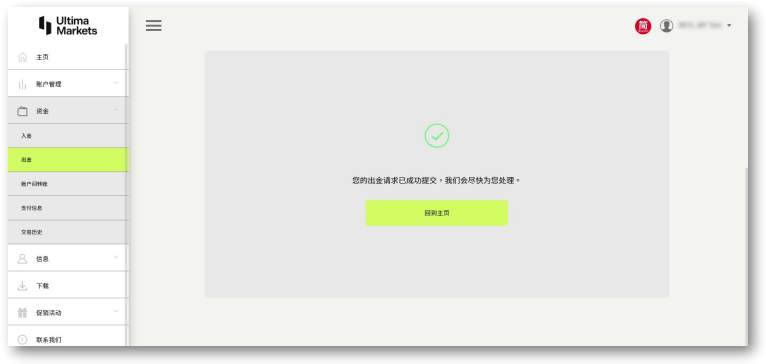
This page shows that you have successfully submitted the withdrawal request. International transfer withdrawals usually require 2 to 5 business days for processing.
UnionPay Withdrawal
In the "Other Types" menu, select "China UnionPay" as the withdrawal method.
After selecting the withdrawal card, click "Submit."
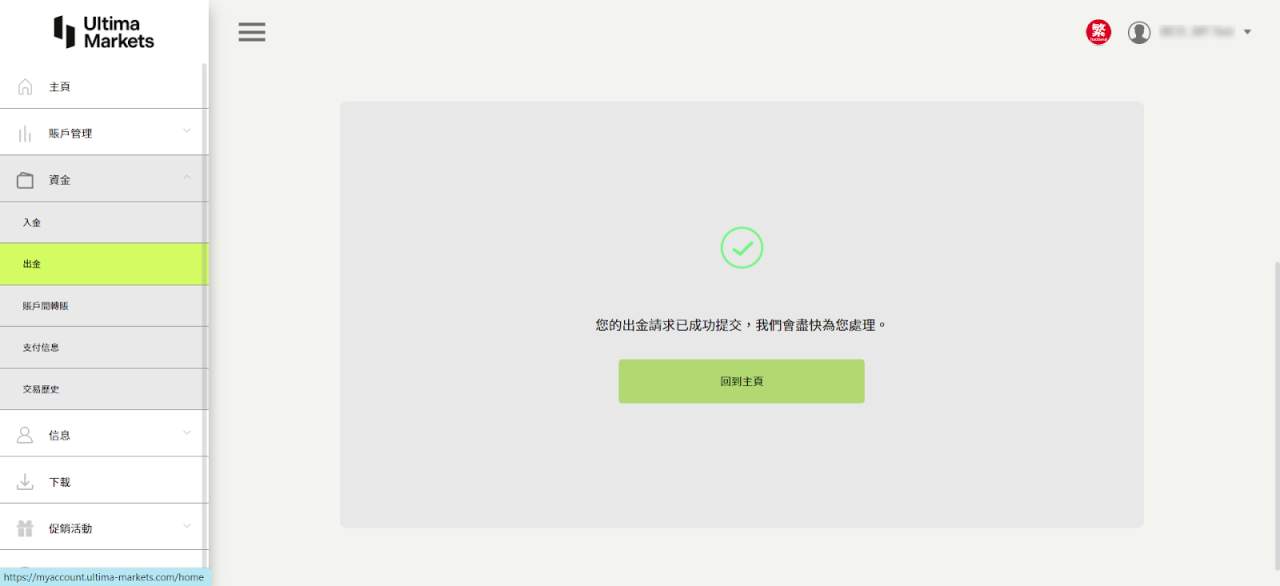
Once successfully submitted, the page will show that you have successfully submitted the withdrawal request. UnionPay withdrawals typically require 2 to 5 business days for processing.
Ultima Markets Withdrawal Frequently Asked Questions
Q: What are the minimum and maximum withdrawal amounts for Ultima Markets?
A:
The maximum withdrawal amount will vary depending on the selected withdrawal method. For detailed information, please click [here].
The minimum withdrawal amount is $40, and withdrawal requests below this amount will not be processed. If your account balance is below $40, you can still submit a "full amount" withdrawal request, but you must withdraw the entire balance in your account.
Q: Does Ultima Markets accept third-party withdrawals?
A:
In accordance with Anti-Money Laundering (AML) and Counter Financing of Terrorism (CFT) regulations, Ultima Markets does not accept third-party withdrawals. For security reasons and company policy, all withdrawal operations must be made to the account holder’s name.
Q: How can I check the progress of my Ultima Markets withdrawal?
A:
If you want to check the progress of your withdrawal, please follow these steps:
- Log in to your account management center.
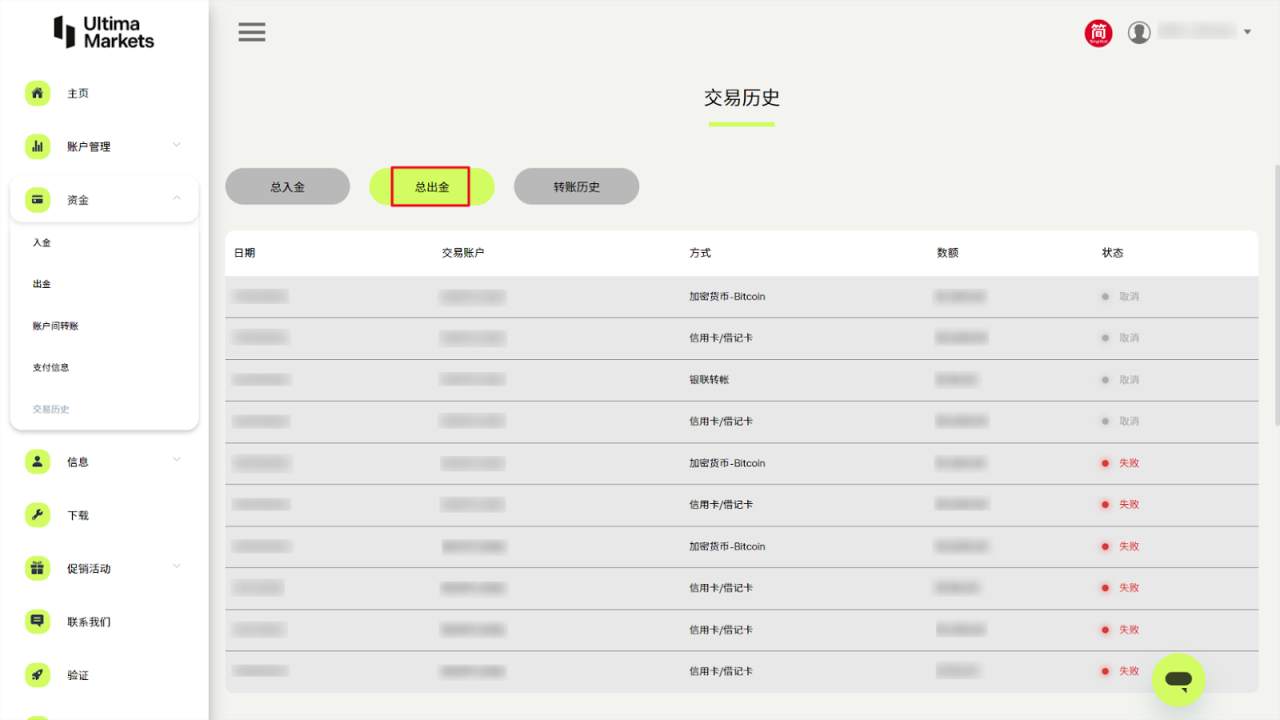
- On the homepage, select the "Funds" option, and then click on "Transaction History."
- In the "Total Withdrawals" section, you will be able to see the progress and details of your withdrawal.
Q: Can I submit a withdrawal request from Ultima Markets on weekends or holidays?
A:
You can still submit a withdrawal request even on weekends or holidays. However, the funds will be processed and credited after the holiday or on the next business day. The actual deposit time will depend on the bank's operating hours.
Q: How can I cancel a withdrawal request after submitting it to Ultima Markets?
A:
If you need to cancel a submitted withdrawal request, please follow these steps:
- Log in to your account management center.
- Under the "Funds" section, click on "Transaction History," then go to the "Total Withdrawals" page.。
- Click the "Cancel" button next to the withdrawal request you wish to cancel.
Click the "Cancel" button next to the withdrawal request you wish to cancel.
If your withdrawal request has entered the review stage, you cannot cancel it. You can contact customer service at [email protected], providing your MT4 account number, application date, and amount. Customer service will help confirm the status of your request. However, if the bank has already processed the withdrawal, it cannot be canceled.
Q: How can I obtain a withdrawal certificate from Ultima Markets?
A:
If you need a withdrawal certificate, we will assist in providing the relevant document. Please contact Ultima Markets as follows:
- Click the "Online Chat" button at the bottom right of the official website to reach customer service, or send an email to [email protected].
- Provide the following transaction details for inquiry:
- MT4 account number and registered email
- Detailed information (such as withdrawal date, time, and amount)
The processing time is approximately 1-2 business days.
FAQ on Withdrawal-Related Topics
Q: How to deposit funds into a forex account?
A:
Forex deposit refers to the process of transferring funds into a trading account. Investors can choose from the following common deposit methods:
Main deposit methods:
- Wire transfer: Suitable for large fund transfers but may take 2-5 business days to process.
- Credit/Debit card: Quick and convenient, suitable for small deposits, but may incur transaction fees.
- E-wallets: Such as Skrill or Neteller, typically fast processing times and relatively low fees.
- Cryptocurrency: For example, USDT, suitable for users who want faster fund transfers, typically processed in minutes to hours.
Important Notes:
- Consistency between deposit and withdrawal methods: According to anti-money laundering (AML) and counter-terrorism financing (CFT) regulations, deposit and withdrawal methods must be consistent to ensure fund security.
- Minimum deposit amount: Different deposit methods may have different minimum deposit requirements, so investors should verify the platform's regulations before making a deposit.
- Processing time and fees: The efficiency and transaction fees of different methods vary. Choose the one that best meets your needs to avoid unnecessary costs.
- Currency conversion: All funds will be automatically converted to the base currency of the trading account. Be sure to check the relevant exchange rate and possible fees in advance.
Selecting the right deposit method not only improves fund management efficiency but also enhances your trading experience.
Q: What does withdrawal mean?
A:
Withdrawal refers to the process of transferring funds from your forex trading account to your personal bank account or other payment methods. This is usually an important step for investors after completing trades or earning profits, as they transfer earnings or balances back to their personal accounts.
Purpose of withdrawal:
Withdrawing Profits: Withdrawing profits means converting the earnings from your trades into cash or other usable funds.
Fund Management: This refers to moving funds from your trading account for use in other investments or personal purposes.
Withdrawal Methods:
Bank Transfer (Wire Transfer): High security, suitable for large amounts, but processing time is longer.
Credit Card Refund: Typically used when the initial deposit was made via credit card. Refund speed varies depending on the platform.
E-wallets: Such as Skrill or Neteller, fast and convenient processing, ideal for small withdrawals.
Cryptocurrency Withdrawal: Such as USDT, with the fastest processing times, ideal for users who need immediate access to their funds.
Important Notes for Withdrawal:
Consistency between deposit and withdrawal methods: According to anti-money laundering regulations, the withdrawal method must be the same as the deposit method.
Fees and Minimum Amounts: Different methods may have varying fees and minimum withdrawal amount requirements. Please confirm the platform’s rules in advance.
Processing Time: Withdrawal time varies depending on the payment method, generally completed within 2-5 business days.
Q: How long does it take for Yuanta to process a withdrawal?
A:
Yuanta Futures typically processes withdrawal requests within T+2 days, meaning the funds will be credited 2 business days after the withdrawal request is made. Please note that withdrawal requests are only processed on business days and do not include holidays.
Online withdrawal requests can be submitted between 8:00 AM and 2:00 PM on business days. For any inquiries, please call the withdrawal hotline at 04-37033390.
Q: What does "deposit and withdrawal" mean?
A:
Deposit and withdrawal refer to the process of funds entering and exiting a trading account in financial transactions. Specifically:
Deposit: Refers to transferring funds from your bank account or other payment methods into your trading platform account to begin or continue your trading activities.
Withdrawal: Refers to extracting funds from your trading platform account to your bank account or other payment methods, allowing you to take back your earned profits or remaining funds.
In forex, futures, cryptocurrency, and other financial transactions, deposit and withdrawal are fundamental processes of fund movement, and they are typically subject to regulations such as anti-money laundering (AML) and counter-terrorism financing (CFT) rules.
Q:How to withdraw funds from OANDA?
A:
Here are the general steps for making a withdrawal on the OANDA platform:
- Log in to Your Account:
- First, log in to your OANDA account.
- 進入資金管理頁面:
- 登錄後,前往帳戶管理頁面,並選擇「資金」或「出金」選項。
- Go to the Fund Management Page:
- After logging in, navigate to the account management page and select the "Funds" or "Withdraw" option.
- Choose a Withdrawal Method:
- OANDA offers several withdrawal methods, including bank transfers and e-wallets (such as PayPal or Skrill). Choose the withdrawal method that matches the one you initially used for your deposit.
- Enter the Withdrawal Amount:
- After selecting your withdrawal method, enter the amount you wish to withdraw. Please note that, according to OANDA's policy, your withdrawal amount may need to meet a minimum amount requirement.
- Submit the Request and Wait for Review:
- The processing time for withdrawals depends on the chosen method. Bank transfers may take 3-5 business days, while e-wallet withdrawals are usually faster, taking about 1-2 business days.
- Confirm Withdrawal Completion:
- After the withdrawal is completed, OANDA will notify you and transfer the funds to your bank account or e-wallet.
Important Notes:
- According to Anti-Money Laundering (AML) policy, the withdrawal and deposit methods must be the same. If you deposited funds via e-wallet, you must withdraw funds via the same method.
- Withdrawal amounts may be subject to minimum and maximum limits, details of which can be found on OANDA's official support page.
The above steps are the general withdrawal process. The specific details may vary depending on your region and the payment method you choose.
Q: How long does it take to withdraw from Mitrade?
A:
The processing time for withdrawals on Mitrade generally depends on the withdrawal method you choose. Here’s an overview of the processing times for different withdrawal methods:
- Bank Transfer:
- Usually takes 3-5 business days. This depends on the bank's processing time and the selected country/region.
- E-wallets (such as PayPal, Skrill, Neteller):
- Typically takes 1-2 business days, making it a faster processing method.
- Cryptocurrency (e.g., USDT):
- If you choose cryptocurrency withdrawal, the processing time is usually faster, often completed within 24 hours, but the actual time may vary depending on the blockchain's transaction confirmation speed.
Important Notes:
- When withdrawing funds, Mitrade requires compliance with anti-money laundering (AML) and counter-terrorism financing (CFT) regulations. Therefore, the first withdrawal may require additional identity verification.
- The minimum withdrawal amount varies depending on the payment method you choose. Please ensure your withdrawal request meets the platform's requirements.
- Withdrawals will go through a review process. If there are any issues, the processing time may be extended.
You can check more specific withdrawal details on the Mitrade platform and view the related restrictions and conditions for your chosen payment method.
Q: How to Withdraw Funds on IG?
A:
The process for withdrawing funds on the IG platform is as follows:
1. Log in to Your Account
First, you need to log in to your IG trading account.
2.Access the Withdrawal Page
After logging in, go to the "Fund Management" or "Withdraw" option and find the "Withdraw Funds" or a similar option.
3. Select a Withdrawal Method
You can choose from several withdrawal methods, including:
- Bank Transfer: Suitable for most countries and regions, usually takes 2-5 business days to process.
- E-wallets (e.g., PayPal, Skrill, Neteller): If you deposited using one of these methods, you can choose the same method for withdrawal. This is usually faster and typically completed within 1-2 business days.
- Credit/Debit Card: Withdrawals to the same credit or debit card used for deposits, usually take 2-5 business days.
4. Enter the Withdrawal Amount
On the withdrawal page, enter the amount you wish to withdraw. Note that IG has a minimum withdrawal amount (usually $100, but it may vary by region).
5. Complete the Withdrawal Request:
Once you've confirmed your withdrawal details, submit the request. Depending on the chosen payment method, the platform may require additional identity verification.
6. Review and Processing:
The withdrawal request will go through IG's review process, and the processing time will vary depending on the chosen method. E-wallet withdrawals are usually quicker, while bank transfers may take longer.
Important Notes:
- Anti-Money Laundering Regulations (AML) : To comply with regulations, all withdrawals must be made using the same payment method you used for deposit. If your deposit and withdrawal methods differ, it may cause delays or be rejected.
- Identity Verification: If this is your first withdrawal, you may be asked to provide additional identity verification documents.
Processing Times:
- E-wallets: 1-2 business days
- Bank Transfer: 2-5 business days
Disclaimer: The views expressed are solely those of the author and do not represent the official position of Followme. Followme does not take responsibility for the accuracy, completeness, or reliability of the information provided and is not liable for any actions taken based on the content, unless explicitly stated in writing.

Leave Your Message Now